September 2026 - Release notes
Product updates for myWorksites. Releases 11.2.10, 11.2.11, 11.2.12, 11.2.13, 11.2.14, 11.2.15, 11.2.16, 11.2.17, 11.2.18, 11.2.19, 11.2.20, 11.2.21, 11.2.22, 11.2.24, 11.2.26, 11.2.27, 11.2.28, 11.2.29, 11.2.30 and 11.2.31
🚨 Important: the classic worksite page was switched off on 30 September
All worksites now open in the new React worksite page by default.
New features
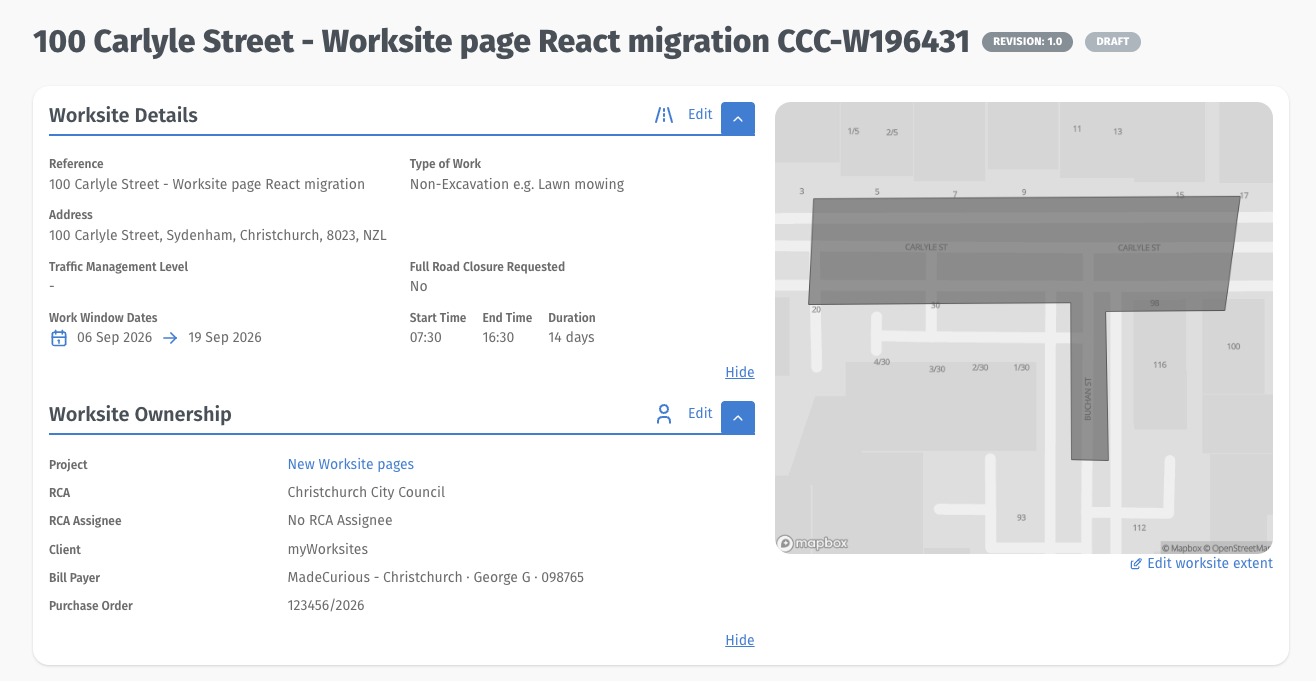
Worksite Pages (NEW designs)
Comment boxes on TMPs and worksite pages now correctly support links and formatting
Approved and declined rows in worksite history are now colour-coded
Content in worksite sections no longer gets cut off in awkward places
Consistent headers now appear across TMP and worksite pages
A quick copy button has been added for a worksite's name, revision number, and status
Worksite titles now retain the CAR ID/number when the title is long
Worksite descriptions now open correctly from the description control
New post-acceptance navigation lets you move directly back to the TMP, to its worksite, or to the Processing Queue upon approval
RCA assignee search now uses a separate input, so typing no longer overwrites the selected assignee text (only relevant for RCA users)
The Worksite TMP list now shows each TMP's description, so TMPs can be told apart at a glance.
Road Space Bookings — recent updates
Nearby RSBs now appear directly on the RSB edit map, with a toggle for overlapping impacts and detours from other bookings
The public impacts map now loads faster with lower memory use for large queries
Worksite contacts can now view all draft and submitted TMPs under their worksite in read-only mode
Generic TMPs with Road Space Bookings now load faster
Deployments now move through clear statuses — Scheduled, Attended, Unattended, Site clear and Complete — with actions to match each state.
Impact types that were missing from the impacts map now show.
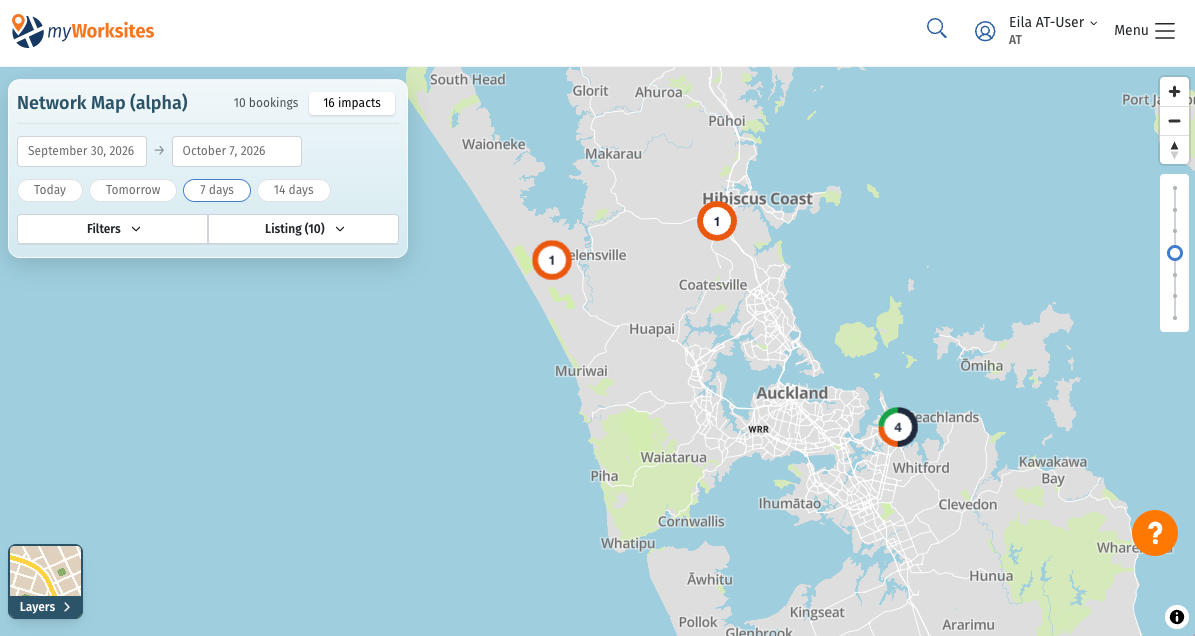
Network Map (alpha)
An early "alpha" version of a network-wide map is now available, built on Road Space Booking data. You can search bookings, filter them, and play back activity over time, with bookings clustered on the map and detail panels for each one.
New controls to clear filters, limit the booking list to the current map view, and sort by date, impact or expected delay. (MYW-7113)
An adjustable clustering threshold, so booking detail appears earlier or later as you zoom. (MYW-7051)
Coordination details now include booking descriptions, site contact numbers and applicant company names, with full-record links still permission-controlled. (MYW-7156)
Loading, drawing, filtering and timeline playback are faster, and edited bookings redraw without reloading the page. (MYW-7042, 7058, 7158, 7157, 7159, 7169, 7049, 7050, 7094)
Booking titles keep TMP codes on one line, with clearer spacing and aligned status pills. (MYW-7210)
Other
Worksite and TMP search results — including TMP search specifically — now show the date each item was accepted
Wellington Transport Alliance's display name now appears as "Wellington Transport Alliance (RCA)"
A new "In Approval (awaiting secondary RCA decision)" status filter is available in TMP Search
All RCA display names now appear in multi-RCA TMP acceptance history entries
The applicant homepage has been unified into a single, role-driven page
Search dropdowns now show a loading indicator while results are being fetched
Saved searches are now grouped into organisation and personal sections, with alphabetical ordering
Worksite search now supports finding overdue worksites, with saved-search support
Region handling has been made more consistent across RCAs and EAR review reasons.
Where a Worksite's proposed works would spatially interfere with the City Rail Link designation (Auckland area), this now appears in the Corridor Characteristics section on the worksite. (RCA internal view only)
Worksite IDs on TMP Search and the TMP Processing Queue link straight to the worksite.
RCA users now get a warning before issuing a permit or accepting a TMP if acceptance conditions or custom-condition text have unsaved changes, with the option to save and continue or keep editing.
Quick search returns results faster.
Existing RCA notes are prefilled when you edit a clash resolution.
The TMP history entry for a joint approval now lists every RCA that approved it, not just the last secondary RCA.
Bug fixes
Resolved a crash when opening an EAR review reason that contains a table
Draft worksites are no longer visible to users who shouldn't have access to them
TMP creation now correctly uses the active organisation as the applicant company and blocks submission when the current role is a jurisdiction
Improved reliability when opening a History tab on a review.
Removed TMP submission files no longer stay visible after submitting a draft revision
The system now returns corridor geometry reliably for complex shapes, instead of repeatedly fail ing on simplification errors
Eliminated duplicate session-expired notifications when users are logged out
TMP worksite selection now distinguishes revisions and clears stale selections when search text changes
Saved search tables now refresh immediately after an edit, without needing a page reload
Addressed an issue where file downloads failed for filenames containing commas
Corrected permission displays for organisations with pipes or commas in their names
Date-range results around New Zealand local-day boundaries are now correct in the public impacts map
Improved the organisation selector so it clears selections correctly and preserves in-progress searches
Long comment strings in History now wrap instead of breaking the page layout
Dashboard processing-queue links now take you to the queue that matches your current configuration
Restricted the pending-user card to company admins only
Worksite contacts can now view all draft and submitted TMPs under their worksite in read-only mode
Planning Map results now include open-ended warranty impacts.
Version pills no longer show stale Draft or Submitted records after a submission or acceptance.
RFI Excel attachments now download correctly and open on Windows.
CSV exports correctly return rows when filtered by contact role.
Links in "your TMP was accepted" emails now work correctly.
Self-intersecting worksite extent polygons no longer cause intersection failures.
The TMPs tile on the RCA users' Home dashboard now opens TMP search. Previously both the Worksites and TMPs tiles opened Worksite search.